
What Happened? Something is off and the logic on the backend isn’t able to continue to confidently tie the associated Membership ID to the participant in Welld. There is a Membership Sync Issue
By Clicking On the “Membership Sync Issue” row you are taken to a list of all the enrollments in that status. You will see that while there is information populated in all areas, the Membership System status is “Sync Failed”.
How to correct:
- Click a person’s name in Welld to open the profile for that person. You'll see “Member Not Connected" in red.

- Click the arrows to expand the current membership sync information section.

- Use the data in Welld (Name, DOB and Location) to search the member in your MMS. Once you have located the member in your MMS, click DISCONNECT MEMBER in Welld under the "Actions" dropdown menu:
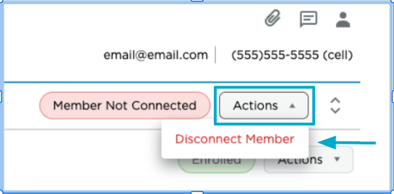
- A warning will pop-up and select CONTINUE.
- The screen will automatically return to the member’s profile in Welld. Return to the "Actions" dropdown menu and select "Connect Member".
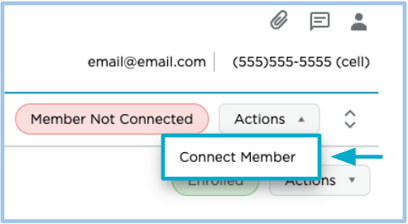
-
Search by the correct scan tag ID or membership ID from your MMS.
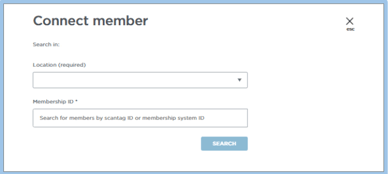
- Search for the member via their Location and barcode or scan tag ID from your MMS. Verify the member profile found is the correct person you want to connect and select "Connect This Membership".